Turn Up the Volume in Your Browser
Do you ever wish that your browser could simply play louder? Sound Booster is a tiny add‑on for Chrome and Edge that gives you control over the volume in each tab. There’s no extra software to install — it works right inside your browser.
Why You’ll Love
Sound Booster
Completely free and safe
We don’t charge for the extension, and it’s been checked by antivirus tools.
No installation hassles
Just add it to your browser; there’s nothing else to download.
Works everywhere
Whether you’re on YouTube, Netflix, Spotify, Reddit or other sites, you can crank up the sound.
Chrome, Edge and more
It’s not just for Chrome — Sound Booster plays nicely with Edge and other modern browsers.
Simple controls
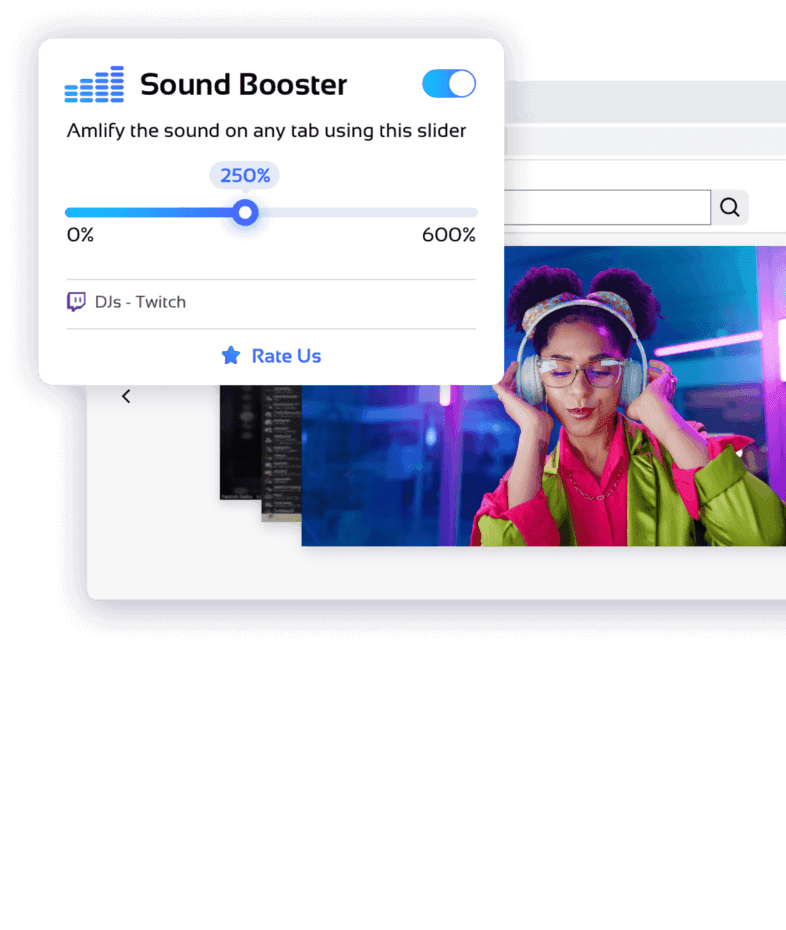
A single slider and an on/off switch let you set the perfect volume for the current tab.
How it works
Install
Head to your browser’s extension store and add Sound Booster with one click.
Enable
Tap the On/Off button to start boosting audio on the tab you’re using.
Adjust
Slide the control to boost the volume up to five times louder and enjoy the clarity.
When to Use It
Movies and shows
Make dialogue crisp and clear on your favourite streaming services.
Gaming
Hear every footstep and sound cue in online games like PUBG or Call of Duty.
Music and podcasts
Turn up the volume on playlists and podcasts right from the browser.
Online classes
Boost the sound on lectures and webinars without touching your system settings.
Frequently Asked Questions
What is Sound Booster?
Anyone who feels their browser audio is too quiet: film fans, music lovers, gamers, students and transcribers. If the sound in a tab isn’t loud enough, Sound Booster can help.
Why is it free?
We believe everyone deserves comfortable listening. The extension is free to use and is kept alive by user feedback, good reviews and optional donations
What does it actually do?
It uses the browser’s built‑in audio controls to amplify the sound in the current tab. A special gain node multiplies the volume, but it only affects that tab — your system volume and other apps stay unchanged.
Do I need it if my speakers are already good?
Even the best speakers can’t fix a quiet video. Sound Booster lets you raise the volume on that specific tab without turning up everything else or installing extra software.
Does it improve sound quality or bass?
No, it simply makes things louder. It doesn’t adjust individual frequencies or enhance audio quality. If you need fine‑tuning, use an equaliser or audio player.
Can it help with quiet recordings?
Yes, it can amplify a quiet recording so you can hear speech better. It doesn’t filter out noise — it just increases the overall volume.
Will it work for browser games?
Absolutely. If you play games or watch streams in your browser, you can boost that tab’s volume without affecting other windows. It doesn’t add surround sound or improve audio fidelity.
Why adjust volume per tab?
Different sites play at different volumes. Being able to tweak each tab individually means you can pump up a quiet video without making other tabs blare.
Which devices are supported?
Sound Booster works on desktop versions of Chrome and Edge across Windows, macOS, Linux and Chrome OS. Mobile browsers often don’t support extensions, so features there may be limited.
Could it damage my speakers?
As with any volume boost, pushing it to the maximum for long periods can cause distortion and strain cheaper speakers. It’s best to find a comfortable level and avoid staying at full blast all the time.
How do I turn it off?
Click the Sound Booster icon and slide the control back down or toggle the switch off. The tab will instantly return to its original volume.
Can I manage several tabs at once?
Yes. Each tab has its own setting. You can have one tab quietly playing music while another tab’s video lecture is boosted so you hear it clearly.
Will it interfere with other audio extensions?
Sound Booster works independently and generally plays well with others. However, if you use multiple tools that boost or modify audio, they might compete for the same audio stream. Use them together only if you know they won’t conflict.
Turn Up the Volume in Your Browser
Do you ever wish that your browser could simply play louder? Sound Booster is a tiny add‑on for Chrome and Edge that gives you control over the volume in each tab. There’s no extra software to install — it works right inside your browser.